Requirement #2040
open

Authorization (login)
Description
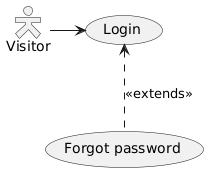
1. To log into the system, the Visitor clicks Login link in the top-right corner of the System main page.
2. Login form contains the following elements:
- E-mail:
- Password:
- Forgot password link
- [SIGN IN] button
2.1 Login form fields
| Field | Required | Max length | Constraints |
|---|---|---|---|
| Y | 256 | 6-256 characters, regexp: /^.+@.+\..+$/ , see RFC 822 RFC 5321 | |
| Password | Y | 64 | at least 8 characters, at least one capital letter, at least one digit, at least one special character |
3. On successful login
3.1 The System displays a page providing all the functionality available to the user according to the user role
3.2 Login event (LOGIN_SUCCESS) is logged (see p.6 below)
4. On authorization error
4.1 Red-colored text "Authorization failed" appears above the Login form
4.2 E-mail field contains previously entered email
4.3 Wrong password error (LOGIN_FAILED_WRONG_PASSWORD) is logged (see p.6 below)
5. Forgot password link
5.1 Displays a form:
- Email
[Reset password]
5.2 [Reset password] emails password reset link to the 'Email' address entered and returns back to the login form (p.2 above).
5.3 If the user identified by 'Email' does not exists, then no email will go out.
5.4 Successful request is logged (see PASSWORD_RESET below)
5.5 User lookup failure is logged (see PASSWORD_RESET_FAILED below)
5.6 Regardless of the result, the following text pops up on top of the login form:
"If your email address exists in our database, you will receive a password reset link at your email address in a few minutes.".
6. Audit requirements
The following events are to be saved into the system log:
LOGIN_SUCCESS
LOGIN_FAILED_WRONG_PASSWORD
PASSWORD_RESET
PASSWORD_RESET_FAILED
 Updated by
  Updated by
  Updated by